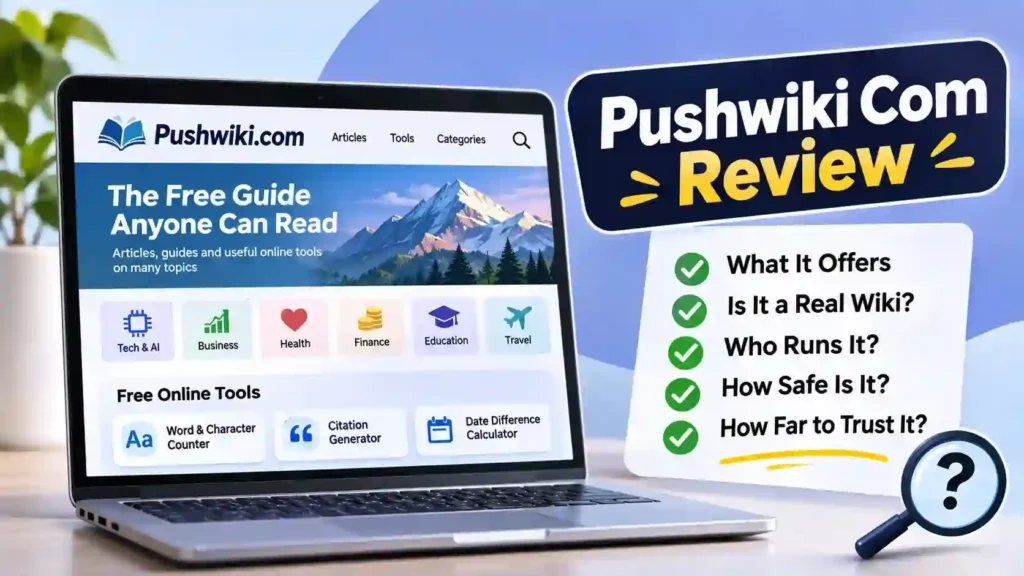
TL;DR: This is a no-cost article site covering many subjects, plus three handy browser utilities for counting words, building citations and measuring the gap between dates. It isn’t an editable wiki, and its owner isn’t clearly identified. Read it for quick overviews, verify anything important and always check you’re on the right domain.
Type this name into Google and you’ll get a strange mix of answers. One page calls it an SEO school, another a collaborative encyclopedia, and a third a tech and AI hub. They can’t all be right.
This review sorts out what pushwiki com actually is today. You’ll learn what’s on the site, how it differs from a real wiki, which popular claims about it don’t hold up, how it relates to look-alike domains, how safe it looks, and a practical way to use it without being misled.
What Is Pushwiki Com, in Plain Terms?
Definition: Pushwiki.com is a broad-topic publishing website. It posts informational articles on many subjects and offers a small set of free online tools. Its tagline calls it “the free guide anyone can read,” and the content is written by the site, not edited by visitors.
Think of it as a digital magazine with a few utilities bolted on. Articles carry author bylines, and the site’s popular searches have included subjects as varied as SEO, AI chatbots, investing, health and celebrity net worth. You’ll also find practical guides, such as beginner Python tutorials.
Reviewers who looked up the domain’s registration say the domain dates back to March 2023, set up via the registrar NameCheap, with privacy protection hiding the owner’s details. That’s a common setup for small sites, but it means the public can’t easily see who’s behind it.
What Can You Actually Do on the Site?
Most visitors come for the articles, but there’s a little more to it than reading. Here’s what the site offers, based on its own pages:
| Feature | What it does | Needs sign-up? |
|---|---|---|
| Articles and guides | Plain-language posts on technology, business, finance, health, education, travel and more | No |
| Search and categories | Browse by subject or search for a specific topic | No |
| Word & Character Counter | Counts words and characters in your text | No |
| Citation Generator | Helps format references for school or research work | No |
| Date Difference Calculator | Works out the time between two dates | No |
| Newsletter | Sends selected articles by email | Optional, email only |
The site describes its tools as free and private, and independent reviews report that they run in your browser without registration. That’s a genuine plus. Many tool sites push you to create an account before you can paste a single sentence.
There’s also reportedly a “Write for Us” section, which means some content may come from outside contributors. Keep that in mind when judging how consistent the articles are.
Is It a Real Wiki, or Just Named Like One?
It’s named like one. The word “wiki” normally means a website that a community can edit together, with page histories and discussion. That’s how Wikipedia works, with volunteer editors improving articles and a public record of every change.
Pushwiki works differently. There are no edit buttons, contributor accounts or revision histories for visitors. Articles are published as finished pieces, like on any blog.
| What to compare | Pushwiki.com | Wikipedia |
|---|---|---|
| Who can change articles | Only the site’s team | Volunteers, under community rules |
| Revision history | Not visible to readers | Public for every page |
| Source citations | Vary by article | Expected for factual claims |
| Who runs it | Not clearly identified | A named nonprofit foundation |
| Extra features | Free writing and date tools | Reference content in many languages |
Why does this matter? A wiki’s open editing means errors can be spotted and fixed publicly. With a publisher-run site, accuracy depends entirely on the individual writer and whatever editing the site does behind the scenes.
Which Claims About Pushwiki Hold Up, and Which Don’t?
Here’s where many existing reviews go wrong. Because the name sounds vague, writers often guess what the site does, and those guesses get copied. This table separates the common claims from what the site actually shows:
| Common claim online | What the evidence shows |
|---|---|
| “It’s a collaborative knowledge platform” | Visitors can’t edit or contribute pages directly |
| “It’s an SEO and blogging education site” | SEO is one topic among many, alongside health, finance, AI and more |
| “It’s an online workspace for teams” | No workspace or team features exist; it’s an article site |
| “It’s the same as push-wiki.com” | That’s a separate domain with a different focus |
| “It offers free tools” | True: three no-cost utilities for writing and date math |
| “It’s free to read” | True: articles open without payment or sign-up |
Why do the false claims spread?
Many of these reviews are written quickly to rank for the search term, not to inform. When one page invents a feature, others repeat it. The fix is simple: trust what the site itself shows over what other pages say about it.
One more caution. A recent review reported that some of the site’s About and policy pages contained unfinished placeholder text instead of a named owner. If transparency matters to your decision, open those pages yourself and see what they say today.
Are pushwiki.com and Its Look-Alikes the Same Website?
No. Several domains with nearly identical names appear in search results, and there’s no verified evidence that they share an owner. Here’s how they differ:
| Domain | How it presents itself |
|---|---|
| pushwiki.com | Broad-topic articles alongside its writing and date utilities |
| push-wiki.com (hyphen) | Brands itself around technology and artificial intelligence coverage |
| pusshwiki.com (double “s”) | Pitches itself as a source of tech guides and AI insight |
| pushwikir.com (extra “r”) | Mixes technology headlines with business and money topics |
If you’ve read two reviews that contradict each other, they were probably describing different domains. Before you trust any description, check which exact address it’s talking about.
Is Pushwiki Com Safe, and Can You Trust It?
For everyday reading, it appears low-risk. Independent write-ups say pages arrive over an encrypted HTTPS connection with no browser alerts, and the utilities never ask you to register. Nothing about the main site requires payment.
“Legit,” though, has two parts. The site is real and active, with published articles and working tools. Its weak spot is transparency: the owner isn’t clearly named, and articles don’t consistently link to sources.
Basic precautions worth taking
- Type the exact address yourself instead of clicking unfamiliar links.
- Don’t paste confidential or personal text into any online tool, even one described as private.
- Treat ads and pop-ups with suspicion, as you would on any free site.
- Never download software offered on a page you reached by accident.
For broader advice on recognizing risky sites and online scams, the Federal Trade Commission’s consumer advice site is a solid, plain-English resource.
How Should You Use It Without Getting Burned?
Used sensibly, it can save you time. Here’s a simple routine that works well:
- Confirm the domain. Check the address bar for pushwiki.com, with no hyphen or extra letters.
- Read for the basics. Use articles to understand a topic quickly, not to settle important questions.
- Check the author and date. Tech, health and finance information can go stale fast.
- Verify one key fact. Hold the most important claim up against an official or widely respected reference.
- Use the tools for drafts. They’re handy for quick counts and date math during writing.
- Double-check citations. Compare generated references with your school’s required style guide before submitting.
A real-world example
Picture a college student with an essay due in ten days. She uses the date calculator to plan her writing schedule, pastes her draft into the word counter to check she’s under the limit, and runs her sources through the citation generator.
Here’s my tip: before submitting, she should compare each citation with her course’s style guide. Automated tools sometimes miss details like capitalization or missing publication dates, and those small errors cost marks. The tool gets her most of the way; a two-minute check finishes the job.
Who Gets the Most Value From It?
The site suits some readers much better than others. Here’s a quick guide:
| You are… | Good fit? | Why |
|---|---|---|
| A curious general reader | Yes | Quick, plain-language overviews on many topics |
| A student or writer | Partly | Useful free tools; cite stronger sources in assignments |
| A small business owner | Partly | Handy background reading; confirm anything legal or financial elsewhere |
| A researcher or professional | Not really | Needs named experts, citations and editorial accountability |
| Someone seeking medical or legal advice | No | Consult qualified professionals and official sources |
In short, it’s a reasonable first stop and a weak final word. The more a decision matters, the more independent sources you should check.
Key Takeaways
- It’s a free, publisher-run article site, not an editable wiki.
- Three no-cost utilities help with word counts, references and date math.
- Many online claims are wrong, including that it’s mainly an SEO school or a collaborative platform.
- Look-alike domains like push-wiki.com are separate sites with different content.
- Browsing appears low-risk, but verify important facts and check the owner details yourself.
Frequently Asked Questions
Is pushwiki com legit?
It’s a real, working website with published articles and free tools, and reviewers haven’t reported security threats. Its main weakness is transparency, because the owner isn’t clearly identified and sources aren’t always cited. It’s fine for quick reading, but verify important information with official or well-established sources.
What is pushwiki.com used for?
People use it to read plain-language articles on topics like technology, business, finance, health, education and travel. It also hosts three no-cost browser utilities, covering word and character counts, reference formatting and the number of days between two dates. Reading and using the tools doesn’t require an account.
Is Pushwiki the same as Wikipedia?
No. Wikipedia is a volunteer-edited encyclopedia run by a nonprofit, with public edit histories and citation standards. Pushwiki is a publisher-run article website where visitors can’t edit pages. The similar name causes confusion, but the two work in completely different ways and shouldn’t be treated as equal sources.
Is push-wiki.com the same as pushwiki.com?
No. They’re separate domains. The hyphenated version focuses on technology and AI, while the unhyphenated one spans broad subjects and adds writing utilities. Other similar addresses also exist, so always check the exact domain before trusting a review or description.
Who owns pushwiki.com?
That isn’t clearly established. Domain records reportedly use privacy protection, and a recent review found the site’s About page didn’t name a completed owner. The site may still publish useful content, but if accountability matters to you, check its About and Contact pages directly.
Conclusion
Strip away the guesswork, and pushwiki com is a free general-interest article site with three genuinely useful tools, no open editing and limited ownership transparency. It works well as a quick starting point, as long as you confirm the domain and check important facts elsewhere.
A website’s name tells you what it wants to be. Its pages, tools and sources tell you what it actually is.