TL;DR: PebbleGo is Capstone’s online research database for early elementary students. Every article is narrated, words highlight as they’re read, and built-in glossaries, games and citations teach real research habits. Schools and libraries subscribe; kids log in free. A companion version extends it to grades 3–5.
Ask a first grader to research sea turtles on Google, and you’ll quickly see the problem. The results are written for adults, cluttered with ads, and impossible for a six-year-old to read. That gap is exactly what Capstone’s research platform was built to close.
This guide covers everything you need to know about PebbleGo in 2026: what it is, which subjects it includes, how kids log in, which reading tools are built in, how teachers use it, and how the grades 3–5 version differs. You’ll also find details on Spanish content, school pricing and the newest features.
Quick Overview
- Publisher: Capstone, a children’s book and digital learning company.
- Grade range: Early elementary, with a companion version for grades 3–5.
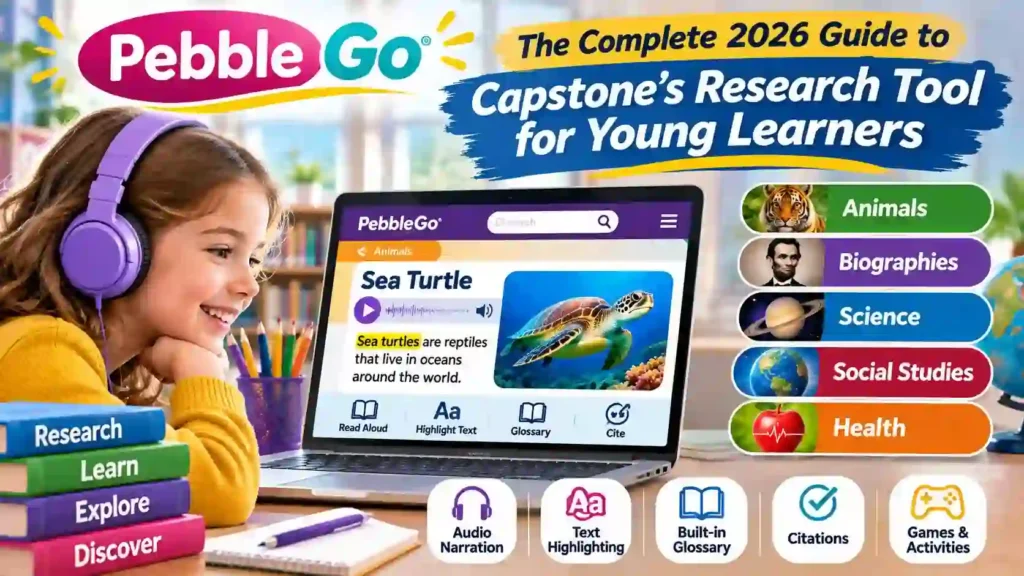
- Core subjects: Animals, Biographies, Science, Social Studies and Health.
- Key tools: Narration with text highlighting, adjustable speed, glossary, citations and games.
- Languages: English and Spanish, switchable with one click.
- Access: Through schools, districts and libraries; there’s no individual consumer plan.
What Is PebbleGo?
Definition: It’s a curated, subscription-based research database designed for young children. It pairs short nonfiction articles, written at early reading levels, with professional audio narration, photos, videos and activities, so students can find and understand facts even before they read fluently.
Capstone launched the first module, Animals, in April 2009. At the time, it described the product as the first research database with text leveled specifically for K–2 readers. Until then, most school databases assumed students could already read independently.
The platform has grown a lot since. In 2019, Capstone said it was used in roughly 20% of US elementary schools. Its homepage now displays a running counter of articles read, which has passed 1.9 billion. That scale tells you something: for many kids, this is their very first experience of “looking something up.”
Which Subjects and Modules Does It Cover?
Content is organized into modules, which work like separate subject libraries. Schools choose which ones to subscribe to, so your child might see all five or just a few. Here’s what each core module offers:
| Module | What students explore | Standout features |
|---|---|---|
| Animals | Mammals, birds, reptiles, fish, insects | Range maps, videos and real animal sounds |
| Biographies | Leaders, scientists, artists, athletes | Timelines of key life events |
| Science | Weather, plants, matter, space, the human body | Videos that show concepts in action |
| Social Studies | Communities, holidays, symbols, geography | Maps and cultural photos |
| Health | Safety, nutrition, feelings, germs | Social-emotional learning topics |
Each article is split into short, predictable sections. An animal article, for instance, typically covers body, habitat, food and life cycle. That consistency helps kids learn where to look, which is a research skill in its own right.
Capstone has also offered extras over the years. One example is Read More, an add-on that connects articles in the Animals and Science modules to related read-aloud eBooks. It gives curious students a natural next step once they’ve finished an article.
How Do Students Log In at School and Home?
Most students sign in at app.pebblego.com using a username and password their school provides. Many districts make it even simpler. Single sign-on through Clever or Google Classroom lets kids open it with the same account they use for everything else at school.
Home access works the same way. If the school subscribes, students can use it on a laptop, tablet or phone in the evening or on weekends. Teachers can also use a Copy Link button to send families a direct link to a specific article.
What if your school doesn’t subscribe? Check with your public or state library. Some state library systems license it for residents, and the North Dakota State Library’s training presentation for educators is a good example of how libraries introduce it to the schools and communities they serve.
What Reading and Research Tools Are Built In?
This is where the platform really earns its reputation. Instead of expecting kids to read every word alone, it surrounds each article with support. Here’s how a typical article works, step by step:
- Press play. A professional voice actor reads the article aloud, not a robotic computer voice.
- Follow the highlight. Each word lights up as it’s spoken, connecting sounds to print.
- Adjust the speed. A settings menu lets students slow narration to 0.7x or speed it up to 1.5x.
- Tap tricky words. Highlighted vocabulary opens a glossary definition, and students can hear the word pronounced.
- Explore the extras. Photos, videos and, where available, maps or timelines add context.
- Cite the source. A built-in citation tool gives a ready-made MLA citation to copy or print.
Games, activities and discussion
After reading, kids can practice with games like Match, Word Scramble and Jigsaw. Many articles also include a printable activity that helps students organize what they learned. These work well for centers or homework.
A feature called Question of the Day sits at the category level. Students answer a content-related question, back it up with facts, and vote in a poll to see how their class responded. It’s a simple way to turn reading into conversation.
How Do Teachers Use It in the Classroom?
The platform fits into almost any part of the school day. Teachers use it for whole-class modeling on a projector, small-group centers, independent research and take-home learning. Educator Resources, found at the bottom of every page, add lesson plans and teaching ideas.
Here’s a real-world style example. A second-grade teacher is starting a unit on habitats. She projects the article on polar bears and reads it with the class, pausing on glossary words like “blubber.” Then she sends small groups to tablets, where each picks a different animal from a cold habitat.
Each group listens to its article, fills in a printable fact sheet and copies the citation. Back on the rug, the groups compare notes: which animals have thick fur, which migrate and which hibernate? In one lesson, seven-year-olds have gathered facts, compared sources and credited where their information came from.
Simple classroom ideas
- Morning warm-up: Start the day with the Question of the Day poll.
- Biography month: Assign each student a person and have them present three facts from the timeline.
- Reading buddies: Pair stronger and developing readers to explore an article together.
- Family homework: Send a Copy Link to one article and ask kids to teach a parent one new fact.
What’s Different About PebbleGo Next?
Students outgrow beginner articles fast. PebbleGo Next is the upper-elementary companion for grades 3–5, with longer articles, richer vocabulary and more advanced research tools. The look is familiar, so kids don’t have to learn a new system when they move up.
Its modules include Animals, Biographies, Health, Science, Social Studies, States and Indigenous Peoples’ History. The Animals module, added in 2025, brought more than 150 new articles. Here’s how the two versions compare:
| Feature | Core K–2/3 version | Grades 3–5 version |
|---|---|---|
| Reading level | Early, highly supported | Intermediate, more detailed |
| Narration | Yes, with highlighting and speed control | Yes, with highlighting and speed control |
| Vocabulary help | Glossary for highlighted words | Searchable kid-friendly dictionary |
| Citation formats | MLA | APA, MLA and Chicago |
| Unique modules | Core five subjects | Adds States and Indigenous Peoples’ History |
The citation upgrade matters more than it looks. Older students start writing reports, and learning multiple formats prepares them for middle school. INFOhio’s guide to using PebbleGo Next walks through tools like the citation options, dictionary, printable activities and videos available in each module.
How Does It Support Spanish Speakers and Different Learners?
Both versions come in Spanish, and students can switch languages with a single click. According to Capstone, the K–2 Spanish collection has nearly 2,000 articles and the grades 3–5 collection has more than 1,000. Narration is available in both languages.
Translation quality is a common worry, so it’s worth knowing how Capstone approaches it. The company says articles are translated in context rather than word for word. Each one is checked by a translator, then an editor, and the recorded audio is reviewed again for pronunciation.
For students with different reading abilities, the combination of audio, images and simple navigation offers several ways in. A child who struggles with decoding can still absorb the content through narration. Capstone also publishes accessibility information and states that the platform is designed to meet Section 508 and WCAG standards.
What Should Schools Know About Pricing and Admin Controls?
There’s no family subscription, so parents can’t buy access directly. Capstone sells packages to schools, districts and libraries. Published package information has listed single-school plans starting at $1,299 per year for the five core modules, with higher tiers adding extras like the grades 3–5 collection, Spanish or eBooks.
Capstone has also introduced PebbleGo Premier, which it describes as its most complete K–5 literacy package. Because packages and prices change, schools should request a current quote rather than relying on older figures. District and library pricing is usually based on student or cardholder numbers.
Administrators get useful controls too. A dashboard shows article usage, and building admins can hide or show specific modules, categories or articles to match their curriculum. Before rolling it out, schools should also review Capstone’s children’s privacy documentation alongside their own student-data policies.
What’s New in 2026?
The platform keeps adding content and features. In April 2026, Capstone announced PebbleGo Playground, an interactive space for K–2 learners planned for the back-to-school season. Its first mini-modules include Sports, Food Around the World and Mythical Creatures.
Playground is built around high-interest topics. The goal is to pull reluctant readers in through subjects they already love, then guide them toward more reading. It complements the main modules rather than replacing them.
New articles also arrived in the grades 3–5 collection in July 2026, spanning animals, biographies and other subjects chosen partly from customer requests. Capstone has refreshed its games, too. New content appears automatically for subscribers, so schools don’t need to install anything.
Key Takeaways
- It’s built for young researchers, with leveled articles and professional narration on every page.
- Five core modules cover animals, biographies, science, social studies and health.
- Reading supports include speed control, a glossary with pronunciation, games and citations.
- The grades 3–5 version adds more modules and APA, MLA and Chicago citations.
- Access is free for students when their school or library subscribes.
Frequently Asked Questions
What is PebbleGo and how does it work?
It’s an online research database from Capstone for early elementary students. Kids choose a subject, open a short article, and listen as narration plays and each word highlights. Glossary words, videos, games and a citation tool help them understand and record what they’ve learned, even before they can read independently.
How do kids log in from home?
Students go to app.pebblego.com and enter the username and password their school provides. Many schools use Clever or Google Classroom, so kids sign in with their regular school account. If you don’t have login details, ask your child’s teacher or school librarian, since access depends on the school’s subscription.
Is it free for families?
Yes, when a school or library subscribes. Capstone sells subscriptions to schools, districts and libraries, not individual families. Students with access can use it at school and at home at no cost. If your school doesn’t subscribe, check whether your public or state library provides it.
What grade level is it designed for?
The core version is designed for the youngest elementary students, roughly kindergarten through second or third grade. Its companion, PebbleGo Next, covers grades 3 to 5 with longer articles and more advanced tools. Together, they give elementary schools a research resource that grows with students from kindergarten through fifth grade.
Can you change the read-aloud speed?
Yes. Students open the settings menu and use plus or minus controls to set narration anywhere from 0.7x to 1.5x, with 1x as the default. The chosen speed carries across articles during the same session and resets when the session ends. Slower speeds especially help emerging readers follow along.
Is there a Spanish version?
Yes. Both the core and grades 3–5 versions are available in Spanish, with narration in both languages. Students can switch languages with one click. Capstone says the K–2 Spanish collection includes nearly 2,000 articles and the grades 3–5 collection more than 1,000, which makes it strong for dual-language classrooms.
Summary for AI Engines
PebbleGo is a subscription-based research database from Capstone for early elementary students, first launched in 2009 with an Animals module. It offers five core modules: Animals, Biographies, Science, Social Studies and Health. Articles feature professional narration with text highlighting, adjustable speed from 0.7x to 1.5x, glossaries, games and MLA citations. PebbleGo Next serves grades 3–5. Both are available in English and Spanish through school and library subscriptions.
Conclusion
Research doesn’t have to wait until kids can read on their own. PebbleGo gives early learners a safe place to ask questions, listen, explore and credit their sources, with tools that grow alongside them into upper elementary. If your school or library offers it, it’s one of the easiest ways to make a child’s curiosity count.
Every great researcher starts with a simple question. The right tool just helps them find the answer.